 CMSC 341 - Project 5: Network of Charging Stations - Spring 2026
Due: Tuesday May 12, before 9:00 pm
Objectives
- To implement a recursive graph traversal algorithm.
- To practice software development with the aid of AI code generation.
- To practice writing prompt for AI code generators.
- To practice writing unit tests with AI.
- To practice working in a Linux environment.
- To practice analyzing and understanding a project requirements.
Introduction
According to the US Department of Energy in 2024 there were 4.5 million electric vehicles and 1.5 million plugin hybrid electric vehicles registered in the US. With the growth rate in sales, a startup company saw the opportunity to create a network of charging stations nationwide. You are assigned a task to develop an app that the drivers can use to plan their trips based on the available charging stations. The app finds a path between a start point and an end point. The company develops their apps using Vide coding method. You need to follow the same approach.
Vibe Coding
Vibe coding is a software development approach where users create applications by prompting AI assistants in natural language rather than writing code line-by-line. Coined by Andrej Karpathy in 2025, it focuses on guiding AI to build, debug, and iterate. It is important to note that while efficient for rapid development, critics highlight that "vibe coding" carries risks and should be treated as a copilot rather than a fully autonomous solution for critical projects.
Key characteristics and aspects of vibe coding include:
- Accessibility: It lowers the barrier to entry, allowing beginners or non-programmers to create functional apps, websites, and tools.
- Workflow: Instead of dealing with syntax directly, users describe features or changes, and the AI generates the corresponding code.
- “Vibe” over structure: Developers use the AI to fix errors through continuous conversation and to improve through ongoing prompts.
- Pros and cons: It encourages rapid prototyping and experimentation, but can also lead to challenges with security, maintainability, and reliability.
Graph
To present the network of connected nodes we may use a graph. Every node has a unique name. In a graph the connections between nodes are called edges. An edge can have a direction to specify the direction of move from a node to a neighbor node. The neighbor nodes are called adjacent nodes.
The following figure presents a graph. In this graph one may move from node 2 to node 4, but there is no path from node 4 to node 2. Another observation is that one may start from node 0 and can reach to node 0 by passing through nodes 1, 2, and 3. That is a loop. Every node can connect to 4 neighbor nodes which are located at north, east, south, and west of the node.

In the project every node of a graph represents a charging station. The program should find all nodes that one needs to pass in order to reach a destination. For example, if a driver wants to go to node 5 from node 0, the program finds and reports the path 0 1 2 3 5. There may be more than one possible path between two nodes, in the current project any correct path is acceptable. In this project we are not trying to find the shortest or longest path. The following algorithm is a sample traversal method for finding the answer:
- visit node 0 and tag it as visited,
- from node 0 there is only 1 connection, then move to node 1, and tag node 1 as visited,
- from node 1 there is only 1 connection, then move to node 2, and tag node 2 as visited,
- from node 2 there are two connections, keep trying all connections until reaching the destination,
- from node 2 move to node 4, tag node 4 as visited,
- node 4 is a dead end, there is no connection, go back to node 2, this is called backtracking,
- from node 2 move to node 3, tag node 3 as visited,
- from node 3 there are multiple connections, try all until reaching the destination,
- from node 3 move to node 0, it is already visited, it is a loop, there is no point to continue, backtrack to node 3,
- from node 3 move to node 5, it is the destination, the problem is solved.
Input to Project
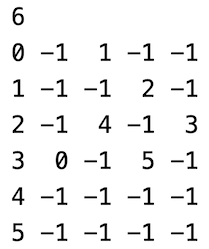
To encode this graph so that it is easy to read into a program, we will list each node along with its reachable neighbors. The following figure presents the data file for the above graph. The first line of the file shows the total number of nodes. The nodes data in the file are presented in 5 columns. The first column represents the node number, the second column represents the node number at north position, the third column represents the node number at east position, the fourth number represents the node number at south position, and the fifth number represents the node number at west position. For example, node 3 connects to node 0 at north. It is not connected to any node at its east side, this is indicated by -1. It is connected to node 5 at south, and it is not connected to any node at west.
The following list presents the assumptions about the data in the file:
- There is no edge from a node to itself.
- From any node in any direction there is only one edge out.
Assignment
Your assignment is to implement a graph data structure. The graph nodes will be stored in a linked list.
For this project, you are provided with the skeleton .h and .cpp files and a sample driver:
- graph.h - Interface for the Node and Graph classes.
- graph.cpp - This file will be completed and submitted.
- data.txt - The data file for the sample graph. You can use this data for development.
- testdata.txt - The data file for the sample graph. You use this data for testing.
- driver.cpp - A sample driver program.
- driver.txt - Sample output from driver.cpp.
Specifications
Class Node
The implementation of this class is provided. You are not allowed to modify this class. The Node class implements a node that can be used in a linked list. Every node has a pointer to the next node in the linked list. This pointer is stored in the m_next member variable. Moreover, every object of this class can point to 4 other node objects which are represented by m_north, m_east, m_south, and m_west member variables. This structure allows for traversing across multiple nodes in different directions using the links.
Class Graph
This class implements a graph data structure. You need to implement the class. The graph nodes are stored in a linked list which is presented by the pointer to its first node. The pointer to the first node is stored in the m_head member variable. The member variable is a Node pointer. A Graph object reads a data file, creates the nodes, initializes the nodes and inserts them into the linked list.
- Read the line “0 -1 1 -1 -1”, the node with 0 value is not in the list.
- Allocate memory for the node, and set its value. Since the node to its north is -1, then there is no need to initialize its m_north variable to a pointer, it should be only initialized to nullPtr.
- The east pointer of node 0 points to the node 1. There is no node 1 in the list. Allocate memory and insert it into the list.
- Initialize the m_east member variable of the node 0 with the pointer for node 1. And continue processing the information for node 0.
- At next line of data file, read “1 -1 -1 2 -1”. Node 1 is already inserted into the list. Then, its information should be processed. The member variables m_north and m_east are initialized to nullPtr.
- The south pointer of node 1 should point to node 2. If the node 2 is not in the list, create it and insert it. Then, initialize the m_south member variable of node 1 to the pointer for node 2.
- Continue the insertion process through the end of information in the data file.
Additional Requirements
- The class declarations (Node) and (Graph) and provided function implementations in graph.cpp may not be modified in any way. No additional libraries may be used, but additional using statements are permitted. Private helper functions may be added, but must be declared in the private section of the Graph class. There is a comment indicating where private helper fuction declarations should be written.
- No STL containers or additional libraries may be used except the ones that are already in the files. STL containers or additional libraries may be used in your tests, i.e. mytest.cpp.
- Your code should not have any memory leaks or memory errors.
- Follow all coding standards as decribed on the C++ Coding Standards. In particular, indentations and meaningful comments are important.
Testing
- The test file name must be mytest.cpp; the file name must be in lower case, a file name like myTest.cpp is not acceptable.
- The test file must contain the declaration and implementation of your Tester class and the main() function as well as all your test cases, i.e. calls to your test functions.
- You are responsible for adequately testing your work before submission. The following section presents a non-exhaustive list of tests to perform on your implementation.
- You must write a separate function for every test case.
- Every test function must return true/false depending on passing or failing the test. Visual outputs are not accepted as test results.
- The dump() function should not be called in the test functions. The dump() function is only provided to facilitate debugging.
- Tests cannot be interactive. The test file mytest.cpp must compile and run to completion.
- An example of declaring, implementing, and calling a test function, and outputting the test results was provided in the driver.cpp file of project 0.
- The testing guidelines page provides information that helps you to write more effective test cases.
Note: Testing incrementally makes finding bugs easier. Once you finish a function and it is testable, make sure it is working correctly.
Testing Graph Class
- Test building a graph by the alternative constructor for a normal case.
- Test creating an empty graph object.
- Test building a graph in an empty Graph object.
- Test finding a path which does not exist in the graph.
- Test finding a path which exists in the graph. Also, write a separate test function to check whether there exists a second different path for this existing path. Call this test function theSecondPath().
- Test finding a path from a node to itself.
- Test finding a path in which the start node does not exist.
- Test finding a path in which the end node does not exist.
- Test Graph class assignment operator for a normal case and an empty graph object. Your test should check whether a deep copy is created. There are two ways of doing this. You can compare the list pointers, they should not match. Then, you compare all values in the corresponding nodes, all values should match. Another way of checking on deep copy is to clear the rhs object, and check whether the current object contains data. Either way is acceptable.
Testing For Memory Leaks / Memory Errors
- Run your test program in valgrind; check that there are no memory leaks or errors.
Note: If valgrind finds memory errors, compile your code with the -g option to enable debugging support and then re-run valgrind with the -s and --track-origins=yes options. valgrind will show you the line numbers where the errors are detected and can usually tell you which line is causing the error. - Never ignore warnings. They are a major source of errors in a program.
What to Submit
You must submit the following files to the proj5 submit directory:
- graph.h
- graph.cpp
- mytest.cpp (Note: This file contains the declaration and implementation of your Tester class as well as all your test cases.)
- report.pdf (This file contains a summary report of your interaction with AI as well as a public link to your chat with AI. The report is no more than two pages.)
- chat.pdf (This file contains your entire AI chat tread.)
If you followed the instructions in the Project Submission page to set up your directories, you can submit your code using the following command:
cp graph.h graph.cpp mytest.cpp report.pdf chat.pdf ~/cs341proj/proj5/
Grading Rubric
For details of grading rubric please refer to Project Grading Policy
Please note, in addition to the regular grading rubrics, this project's report will be graded based on the following items:
- Iterative Refinement: For example, asking the AI to "Refactor this function to be more memory-efficient" or "Add error handling for file input, etc"
- Explanation Seeking: For example, asking the AI to explain a complex C++ template or a compiler error like segmentation fault (core dumped).
- Pseudocode-to-Code: Providing a logical flow in English and asking the AI to translate it into C++.
If a submission is performing the following, it wil not receive any credits:
- Prompt-Only Engineering: Providing a single prompt of the entire assignment description and submitting the first result without any edits or testing.
- Hardcoding Results: Asking AI to "Generate a program that just prints the expected output of the test cases" rather than solving the underlying logic.